The LiteLLM Supply Chain Attack Is the Best Argument for Docker-Isolated MCP Servers
LiteLLM v1.82.7 was compromised via a poisoned GitHub Action. The .pth malware fires on every Python startup, stealing SSH keys, cloud creds, and API keys. Many MCP servers pull LiteLLM as a transitive dependency.

On March 18, 2025, an attacker group calling themselves TeamPCP compromised LiteLLM, the popular Python library for unified LLM API access. The attack was elegant in its simplicity and devastating in its scope: two poisoned PyPI releases — v1.82.7 and v1.82.8 — shipped with malware that activates on every Python startup, silently exfiltrating SSH keys, cloud credentials, API tokens, and cryptocurrency wallet data. The package was live for less than 48 hours before being pulled, but with 97 million monthly downloads across the LiteLLM ecosystem, the blast radius was enormous.
This incident is not just another entry in the growing catalog of supply chain attacks. It is a concrete, real-world demonstration of why running MCP servers without container isolation is reckless. If your MCP server pulls LiteLLM as a dependency — and many do — this attack had a direct path to every secret on your host machine.
The Attack: From GitHub Action to PyPI Backdoor
The compromise started not with LiteLLM’s source code, but with a GitHub Action in its CI/CD pipeline. The attacker compromised a Trivy security scanning action — the very tool meant to catch vulnerabilities — and used it to extract the PYPI_PUBLISH token from LiteLLM’s GitHub Actions secrets. With that token in hand, they published two malicious versions directly to PyPI.
The payload was a file called litellm_init.pth. Python .pth files are a particularly insidious attack vector: they execute automatically whenever Python starts up. No import litellm needed. No explicit function call. If the package is installed in your environment, the malware runs every single time the Python interpreter launches. This is not a theoretical risk — it is a design feature of Python’s site-packages mechanism that has been a known footgun for years.
The .pth file contained obfuscated code that decoded to a credential-harvesting script. On first execution, it would:
- Scan the filesystem for SSH private keys (
~/.ssh/), AWS credentials (~/.aws/), GCP service account keys, Azure credential files, and any file matching common API key patterns - Harvest environment variables containing tokens, secrets, and connection strings —
AWS_ACCESS_KEY_ID,OPENAI_API_KEY,ANTHROPIC_API_KEY,DATABASE_URL, and dozens more - Search for cryptocurrency wallets and their seed phrases
- Exfiltrate everything to a command-and-control endpoint via HTTPS, disguised as normal API traffic
- Persist by modifying shell profiles and cron jobs where possible
The attacker did not need to compromise LiteLLM’s GitHub repository, did not need to submit a pull request, and did not need any code review to approve the change. They bypassed the entire source-level trust chain by attacking the publishing infrastructure.
97 Million Downloads and the Transitive Dependency Problem
LiteLLM is not a niche library. It is the de facto standard for applications that need to talk to multiple LLM providers through a single interface. Its 97 million monthly downloads span direct installations and transitive dependencies across thousands of packages.
Here is what makes this particularly dangerous for the MCP ecosystem: many MCP servers use LiteLLM as a transitive dependency, often without their developers knowing it. If your MCP server depends on a library that depends on a library that depends on LiteLLM, you pulled in the compromised version automatically. The malware does not care how deep in the dependency tree it lives. It runs when Python runs.
Consider the typical MCP server deployment:
- A developer builds an MCP server that provides tools for code analysis, database queries, or API integration
- The server uses an LLM routing library for internal AI features, or pulls in a framework that does
- That routing library depends on LiteLLM for provider abstraction
pip installresolves the full dependency tree and installs LiteLLM v1.82.7- The
.pthfile lands insite-packagesand now executes on every Python startup
The developer never wrote import litellm. They may not even know LiteLLM is in their dependency tree. But the malware is now active in their server process.
What This Means for MCP Server Operators
Most MCP servers today run as bare processes on the host machine. They start as a subprocess of the AI client (Claude Desktop, Cursor, VS Code) or run as an HTTP server on localhost. Either way, they inherit the user’s full filesystem permissions and environment variables.
This means a compromised dependency inside an MCP server can access:
- SSH keys:
~/.ssh/id_rsa,~/.ssh/id_ed25519, and any other private keys. With these, the attacker can access any server, Git repository, or service the user has SSH access to. - Cloud provider credentials:
~/.aws/credentials,~/.config/gcloud/application_default_credentials.json,~/.azure/. Full access to cloud infrastructure, including production environments. - API keys and tokens: Every environment variable in the user’s shell. Most developers have dozens of API keys loaded via
.bashrc,.zshrc, or tools likedirenv. - Kubeconfig:
~/.kube/configoften contains credentials for Kubernetes clusters, sometimes including production clusters. - Browser cookies and local storage: On some systems, these are readable by any process running as the user.
- Other project source code: The attacker can read any repository checked out on the machine, potentially accessing proprietary code across multiple organizations.
This is not a vulnerability in MCP. It is the natural consequence of running third-party code without isolation. The MCP protocol itself is not at fault — it is doing exactly what it was designed to do. The problem is that the deployment model gives that code the keys to the kingdom.
Why Docker Isolation Changes Everything
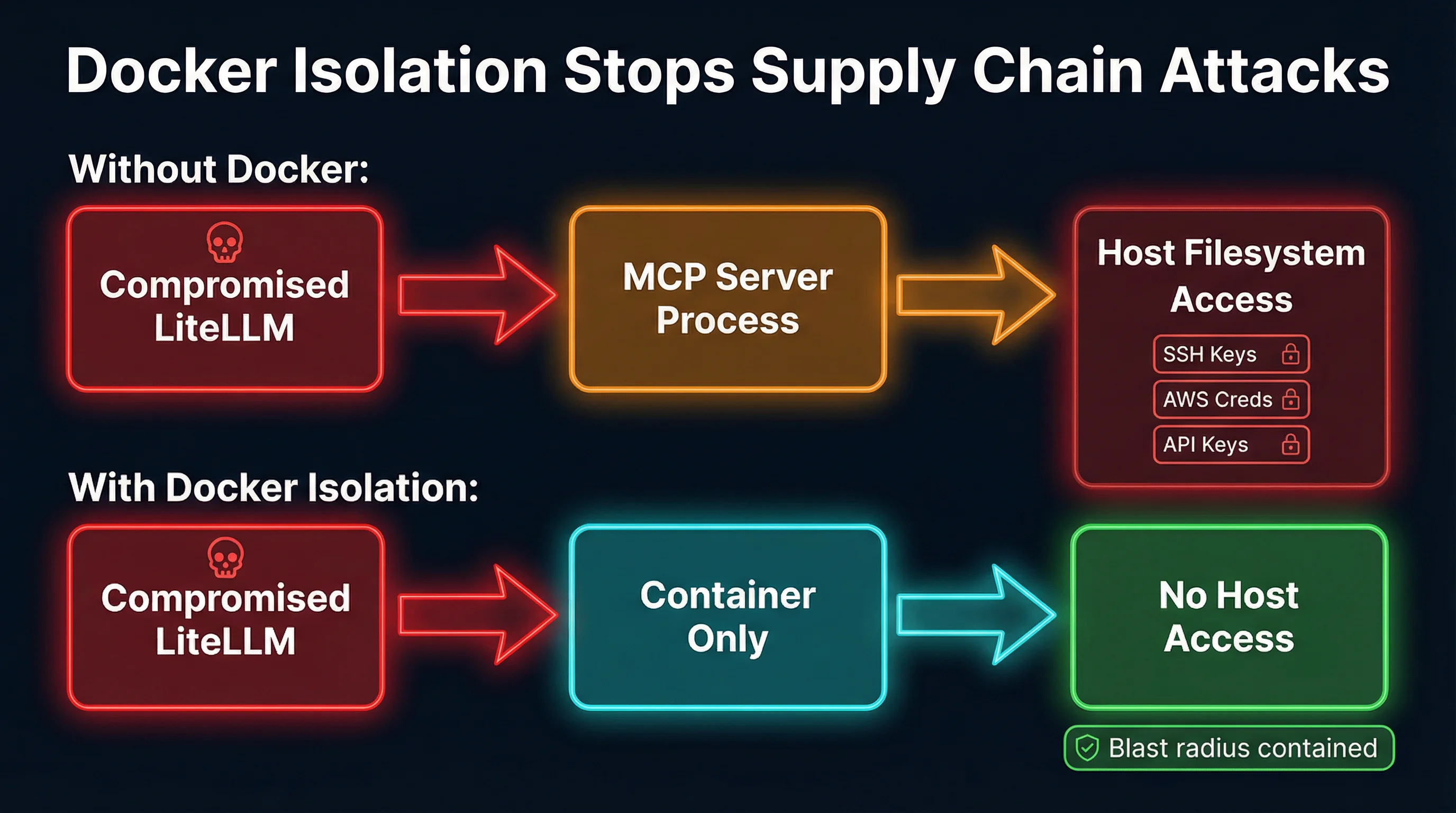
Container isolation fundamentally changes the equation. When an MCP server runs inside a Docker container, the compromised .pth file still executes — but it can only access what is inside the container.
Filesystem isolation. The container has its own filesystem. There is no ~/.ssh/ directory with your private keys. There is no ~/.aws/credentials file with your cloud access. The malware runs its credential-harvesting scan and finds nothing, because the host filesystem is not mounted.
Environment isolation. Environment variables inside the container are only the ones explicitly passed to it. A well-configured container for an MCP server that queries a database might have DATABASE_URL set, but it will not have AWS_ACCESS_KEY_ID, OPENAI_API_KEY, or any of the dozens of other secrets sitting in the host’s environment.
Network isolation. Docker containers can be configured with restricted network access. The malware cannot exfiltrate data if the container’s network is limited to the specific endpoints the MCP server needs. Outbound connections to unknown command-and-control servers get blocked.
Process isolation. The malware cannot see or interact with processes outside the container. It cannot modify shell profiles, install cron jobs, or tamper with other applications on the host.
The critical point is that you do not need to detect the malware for Docker isolation to work. This is a defense-in-depth approach: even if every security scanner misses the threat (as they did in this case — remember, the compromised component was the security scanner itself), the container walls limit what the attacker can reach. The blast radius goes from “everything on the host” to “an ephemeral container filesystem with nothing valuable on it.”
Setting Up Docker Isolation for MCP Servers
The practical implementation is straightforward. Here is what a Docker-isolated MCP server deployment looks like:
FROM python:3.12-slim
WORKDIR /app
COPY requirements.txt .
RUN pip install --no-cache-dir -r requirements.txt
COPY . .
EXPOSE 8080
CMD ["python", "-m", "your_mcp_server"]
The key is what you do not include in the container:
# docker-compose.yml
services:
  mcp-server:
    build: .
    ports:
      - "8080:8080"
    environment:
      - DATABASE_URL=postgresql://...  # Only what the server needs
    # NO volume mounts to ~/.ssh, ~/.aws, etc.
    # NO --privileged flag
    # NO host network mode
    read_only: true
    security_opt:
      - no-new-privileges:true
A few tools in the ecosystem already handle this automatically. MCPProxy runs MCP servers inside Docker containers by default, handling the container lifecycle and stdio/HTTP bridging without requiring users to write Dockerfiles. Docker’s own MCP Toolkit provides similar capabilities. The approach is the same regardless of the tool: put an isolation boundary between the MCP server process and the host.
For servers that need limited host access — say, a file-editing MCP server that needs to read a specific project directory — you mount only that directory, read-only if possible:
volumes:
  - ./my-project:/workspace:ro
The compromised LiteLLM .pth file would still execute inside the container, but its filesystem scan would find only the mounted project files, not your SSH keys or cloud credentials. Even in the worst case, the damage is bounded.
The Broader Lesson: Supply Chain Attacks Are Inevitable
The LiteLLM incident is not an isolated event. It is part of a clear trend:
- ua-parser-js (2021): 8 million weekly downloads, compromised via stolen maintainer credentials, shipped cryptocurrency miners
- event-stream (2018): 2 million weekly downloads, compromised by a new maintainer who added a targeted credential-stealing payload
- codecov (2021): CI/CD tool compromise that leaked environment variables from thousands of organizations’ build pipelines
- SolarWinds (2020): Build system compromise that distributed malware to 18,000 organizations through routine software updates
- xz-utils (2024): A multi-year social engineering campaign to compromise a core Linux compression library used in SSH authentication
The pattern is clear: attackers go where the leverage is. Compromising a single popular dependency means compromising every project that depends on it. The LiteLLM attack is just this pattern applied to the AI/ML ecosystem, which is still young enough that its security practices lag behind its adoption.
For MCP specifically, the risk is amplified. MCP servers are designed to have capabilities — file system access, API calls, database queries, code execution. When you compromise an MCP server’s dependencies, you do not just get data exfiltration. You get a foothold inside a tool that an AI agent trusts and calls repeatedly. The compromised server can manipulate tool outputs, alter agent behavior, and pivot to other systems the agent has access to.
What You Should Do Today
1. Audit your MCP server dependencies. Run pip tree or pipdeptree on every Python-based MCP server you operate. Check whether LiteLLM appears anywhere in the transitive dependency tree. If you were running v1.82.7 or v1.82.8, rotate every credential on the machine immediately — SSH keys, cloud credentials, API tokens, everything.
2. Run MCP servers in containers. Whether you use Docker directly, Docker Compose, MCPProxy, Docker MCP Toolkit, or Kubernetes, the principle is the same: put an isolation boundary between the MCP server and the host. This is the single most impactful step you can take.
3. Pin your dependencies. Use lock files (pip freeze, poetry.lock, uv.lock) and pin exact versions. Do not use floating version specifiers for production MCP servers. Run pip audit or safety check as part of your CI pipeline.
4. Minimize what you pass into the container. Only mount the directories the server actually needs. Only set the environment variables it requires. Apply the principle of least privilege rigorously.
5. Use read-only containers where possible. Set read_only: true in your Docker configuration. If the MCP server does not need to write to its own filesystem, do not let it. This prevents persistence mechanisms.
6. Monitor outbound network traffic. Credential exfiltration requires network access. If your MCP server only needs to reach specific endpoints, restrict its network accordingly. Unexpected outbound connections to unknown hosts are a strong signal of compromise.
Containment, Not Prevention
The uncomfortable truth about supply chain attacks is that you cannot prevent them through vigilance alone. The LiteLLM attack compromised a security scanning tool to steal a publishing token. Code review would not have caught it because the malicious code never went through code review. Vulnerability scanners would not have caught it because the vulnerability scanner was the attack vector.
What you can do is contain the blast radius. Docker isolation does not prevent a compromised dependency from running its payload. It prevents that payload from accessing anything worth stealing. The malware executes, scans the filesystem, finds nothing, and the attack fails — not because you detected it, but because you built an architecture where even a successful attack has nowhere to go.
The MCP ecosystem is still in its early days. The protocol is powerful, the tooling is improving rapidly, and the security practices are catching up. But the LiteLLM incident is a clear signal: if you are running MCP servers with direct host access, you are one compromised dependency away from a full credential breach. Docker isolation is not optional security hygiene anymore. It is the baseline.