The MCP Registry Landscape: Why It Matters and How to Auto-Publish Your Server
MCP servers are scattered across GitHub repos, awesome-lists, and third-party directories. The Official MCP Registry changes that. Here's why registries matter, how the ecosystem fits together, and how to set up automatic publishing from your CI pipeline.

There are over 19,000 MCP servers in the wild. Finding the right one is a different problem than building one. If you search GitHub for “MCP server,” you get thousands of results with no way to tell which ones work, which are maintained, or which will poison your agent’s context window with malicious tool descriptions.
This is the discovery problem. And it is the reason MCP registries exist.
The Discovery Problem
Before registries, finding MCP servers meant browsing awesome-lists, asking in Discord, or stumbling across blog posts. There was no standard way to answer basic questions: Does this server still work with the latest MCP spec? Who maintains it? What version am I running?
The ecosystem looked like this:
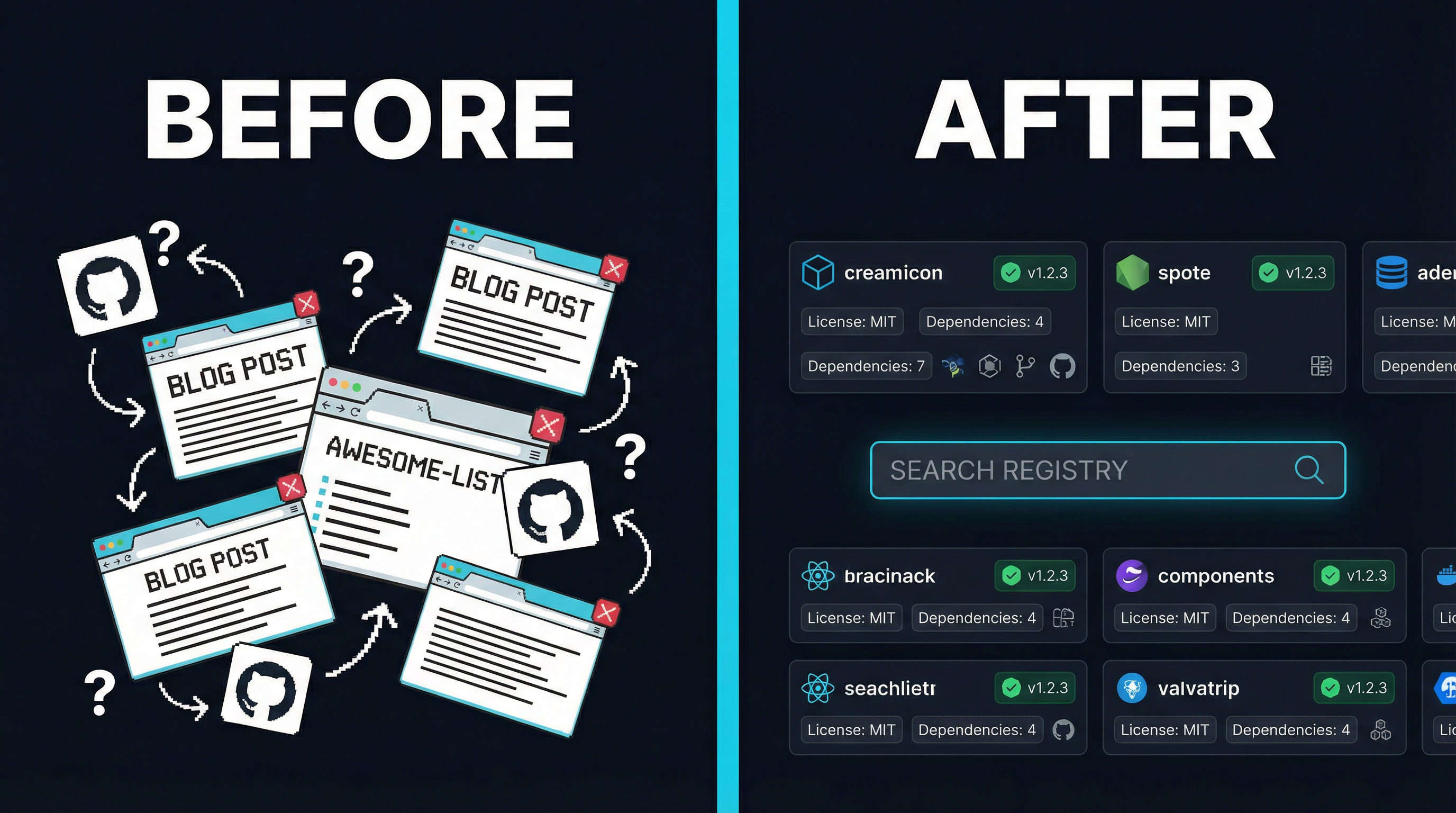
Developers built servers. Other developers needed those servers. Between them sat a void — no searchable index, no version tracking, no trust signals. The awesome-mcp-servers list on GitHub grew to 83,000+ stars, but a curated markdown file cannot validate that a server actually runs, or warn you when a new version breaks backward compatibility.
The Registry Ecosystem Today
The MCP ecosystem now has multiple registries, each serving a different purpose. Here is how they fit together:
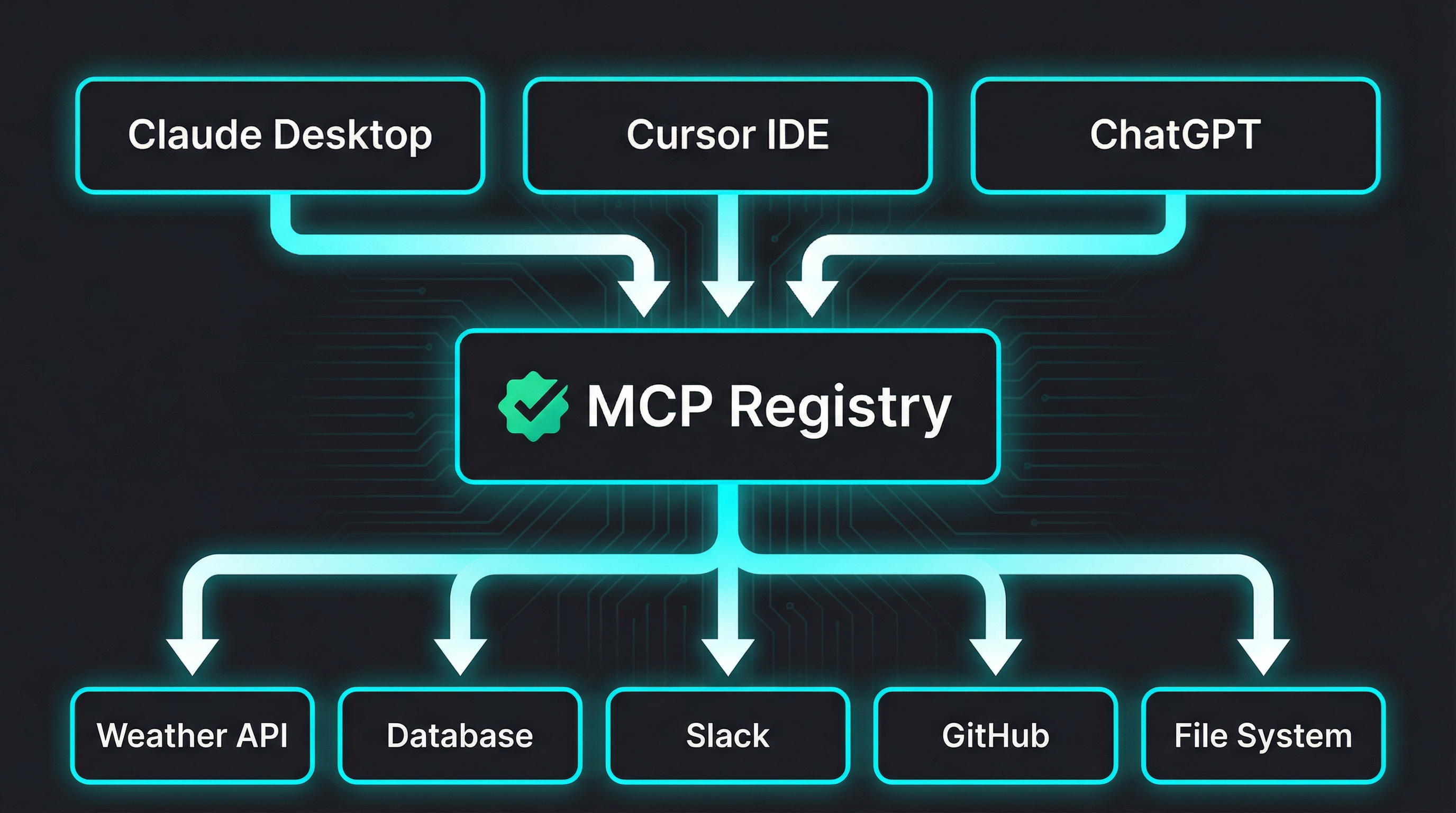
The Official MCP Registry
The Official MCP Registry is maintained by the MCP Steering Committee. It launched as a metadata-only registry — it does not host packages, only points to them. Think of it as a catalog, not a warehouse.
Key design decisions:
- Metadata-only: Packages live on npm, PyPI, Docker Hub, or GitHub Releases. The registry stores a
server.jsonmanifest pointing to those locations. - Verified ownership: Every listing requires proof that you control the namespace. For GitHub-hosted projects, this means authenticating as the org or user that owns the repo.
- Versioned: Each publish is tied to a specific version. Clients can pin to known-good versions rather than hoping
lateststill works. - Machine-readable API: The registry exposes a REST API that clients like Claude Desktop, Cursor, and ChatGPT can query programmatically.
The publishing flow uses a dedicated CLI tool called mcp-publisher:
# Install the publisher
curl -L "https://github.com/modelcontextprotocol/registry/releases/latest/download/mcp-publisher_linux_amd64.tar.gz" | tar xz mcp-publisher

# Authenticate via GitHub
./mcp-publisher login github

# Publish your server
./mcp-publisher publish
Your project needs a server.json at the root:
{
  "$schema": "https://static.modelcontextprotocol.io/schemas/2025-12-11/server.schema.json",
  "name": "io.github.your-org/your-server",
  "description": "What your server does in under 100 characters",
  "repository": {
    "url": "https://github.com/your-org/your-server",
    "source": "github"
  },
  "version": "1.0.0",
  "packages": []
}
The name field follows a reverse-domain convention: io.github.<org>/<repo>. This maps directly to your GitHub namespace, which is how the registry verifies ownership.
PulseMCP
PulseMCP auto-ingests from the Official Registry on a weekly cadence. It adds editorial curation, a newsletter, and community features on top. If your server is in the Official Registry, it will appear on PulseMCP automatically — no separate submission needed.
PulseMCP is run by MCP Steering Committee members and has become the go-to newsletter for tracking what is new in the MCP ecosystem. Getting featured in their weekly digest is one of the highest-signal distribution channels for MCP server authors.
Third-Party Directories
Several community-maintained directories complement the official registry:
| Directory | Servers | How to List |
|---|---|---|
| Glama | 19,400+ | Submit via web form, requires passing build checks |
| awesome-mcp-servers | 83K+ stars | Submit a GitHub PR, must include Glama badge |
| mcp.so | 18,600+ | Submit via web form with GitHub login |
| Smithery | 7,300+ | Requires a hosted HTTP MCP endpoint |
Each has different requirements and audiences. Glama focuses on verified, working servers. The awesome-list is the most visible but has become a bottleneck — PRs now require a Glama listing before merging.
Why Automated Publishing Matters
Manual registry submissions create a predictable failure mode: you publish version 1.0.0 to the registry, ship five more releases, and the registry still shows 1.0.0. Your listing becomes stale. Users install an outdated version. Bug reports come in for issues you fixed months ago.
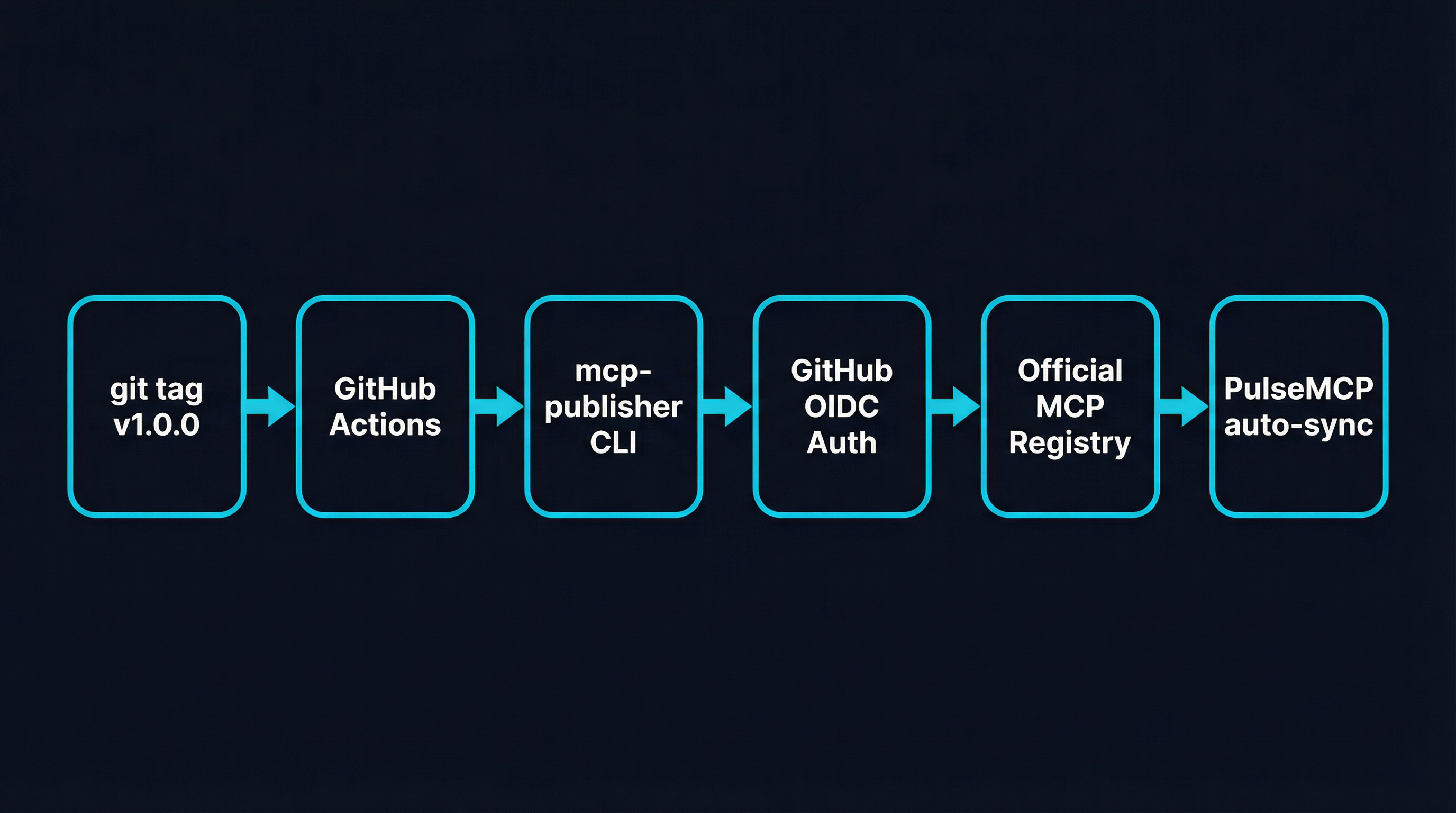
The fix is CI/CD integration. Every tagged release should automatically update the registry.
Setting Up Automatic Publishing with GitHub Actions
The Official MCP Registry supports GitHub OIDC authentication, which means your CI pipeline can publish without storing any secrets. Here is the complete setup:
Step 1: Add server.json to your project
Create server.json at the root of your repository:
{
  "$schema": "https://static.modelcontextprotocol.io/schemas/2025-12-11/server.schema.json",
  "name": "io.github.your-org/your-server",
  "description": "Your server description (max 100 chars)",
  "repository": {
    "url": "https://github.com/your-org/your-server",
    "source": "github"
  },
  "version": "0.1.0",
  "packages": []
}
Step 2: Add the registry job to your release workflow
Add id-token: write to your workflow permissions (required for OIDC), then add this job:
permissions:
  contents: write
  id-token: write  # Required for MCP Registry OIDC auth

jobs:
  # ... your existing build/test/release jobs ...

  mcp-registry:
    name: Publish to MCP Registry
    needs: release  # Run after your release job
    runs-on: ubuntu-latest
    if: startsWith(github.ref, 'refs/tags/v')
    continue-on-error: true  # Don't block release on registry failure
    steps:
      - uses: actions/checkout@v4

      - name: Extract version from tag
        id: version
        run: echo "VERSION=${GITHUB_REF_NAME#v}" >> "$GITHUB_OUTPUT"

      - name: Install mcp-publisher
        run: |
          curl -L "https://github.com/modelcontextprotocol/registry/releases/latest/download/mcp-publisher_linux_amd64.tar.gz" | tar xz mcp-publisher

      - name: Authenticate to MCP Registry
        run: ./mcp-publisher login github-oidc

      - name: Update version in server.json
        run: |
          jq --arg v "${{ steps.version.outputs.VERSION }}"             '.version = $v' server.json > server.tmp && mv server.tmp server.json

      - name: Publish to MCP Registry
        run: ./mcp-publisher publish
Step 3: Make your org membership public
The registry maps your server name (io.github.your-org/...) to a GitHub organization. For OIDC to work, your membership in that org must be public:
- Go to
https://github.com/orgs/your-org/people - Find your username
- Change visibility from “Private” to “Public”
Step 4: Tag and release
git tag v1.0.0
git push origin v1.0.0
Your release workflow runs, builds the artifacts, creates the GitHub Release, and then the mcp-registry job publishes the metadata to the Official MCP Registry. PulseMCP picks it up within a week.
Important: continue-on-error: true
Notice the continue-on-error: true on the registry job. This is intentional. The MCP Registry is still in preview. You do not want a registry outage to block your actual release. The registry publish is a best-effort step — if it fails, you can always publish manually later.
Authentication Options
GitHub OIDC is the recommended method for CI/CD, but the publisher supports several authentication approaches:
| Method | Use Case | Secrets Required |
|---|---|---|
| GitHub OIDC | CI/CD pipelines | None (uses id-token: write permission) |
| GitHub PAT | CI/CD when OIDC unavailable | MCP_GITHUB_TOKEN secret |
| GitHub Interactive | Local development | None (opens browser) |
| DNS Verification | Custom domain namespaces | Ed25519 private key |
For most open-source projects, OIDC is the right choice. Zero secrets to manage, zero tokens to rotate.
What This Means for the Ecosystem
The MCP ecosystem is following the same path that package managers took a decade ago. npm started as a way to share Node modules. PyPI started as a Python package index. Docker Hub started as a container registry. Each began with a simple catalog and evolved into critical infrastructure.
The MCP Registry is at the beginning of that arc. Right now, it is a metadata catalog. Over time, it will likely add features like download counts, security scanning, compatibility matrices, and automatic deprecation notices.
For server authors, the message is clear: publish your server to the Official Registry now. Set up CI/CD so every release is automatically registered. List on Glama and awesome-mcp-servers for additional visibility. The developers who establish their servers in the registry early will have the strongest positions as the ecosystem matures.
The discovery problem is being solved. Make sure your server is discoverable.